Google Agent Java SDK with Spring Boot, Google Firestore and Google Cloud Run
I have explored the Google Agent SDK and Spring Boot to build a simple scheduling and payment assistant agent that can help users schedule meetings, set reminders, and manage their calendars using natural language commands or perform payments.
Understanding the AI Agent Pattern
From a business perspective, adopting the AI Agent Pattern means rethinking application architecture to prioritize AI integration. This involves designing APIs and services that are not only robust and scalable but also optimized for AI consumption. It requires a shift towards data-centric architectures that facilitate real-time data processing and analysis, enabling applications to learn and adapt over time through techniques like reinforcement learning and natural language processing.
Implementation and Deployment
As we go along, I will also explain the architecture and code snippets to help you understand how to implement this pattern in your own applications, some of the deployment challenges, and how to overcome them with Google Agent SDK with Java Spring Boot.
The out of the box adk comes with a simple runner and also built in server to host the agent, that is only suitable for local testing and development. To build a production grade application, we need to integrate the agent sdk with additional framework and real persistance where you can store the data. I did made an attempt to use VertexAiSessionService with Springboot but it there is easy way to set up the prerequisites to use that. A link to the issue is here for referenceDeploying the Java ADK with Spring Boot on Cloud Run
If you are looking to deploy the Google AI SDK with Spring Boot application on Google Cloud Run, you will need to make sure to remove the embedded dev web server dependency from the ADK SDK as Google Cloud Run manages the server environment for you. Especiall Embedded ADK web server dependency google-adk-dev needs to be excluded from the build. If you dont do that you may run into port binding issues as Cloud Run expects the application to listen on the port defined by the PORT environment variable and your instance will never start.
Google ADK (0.4.0 version)
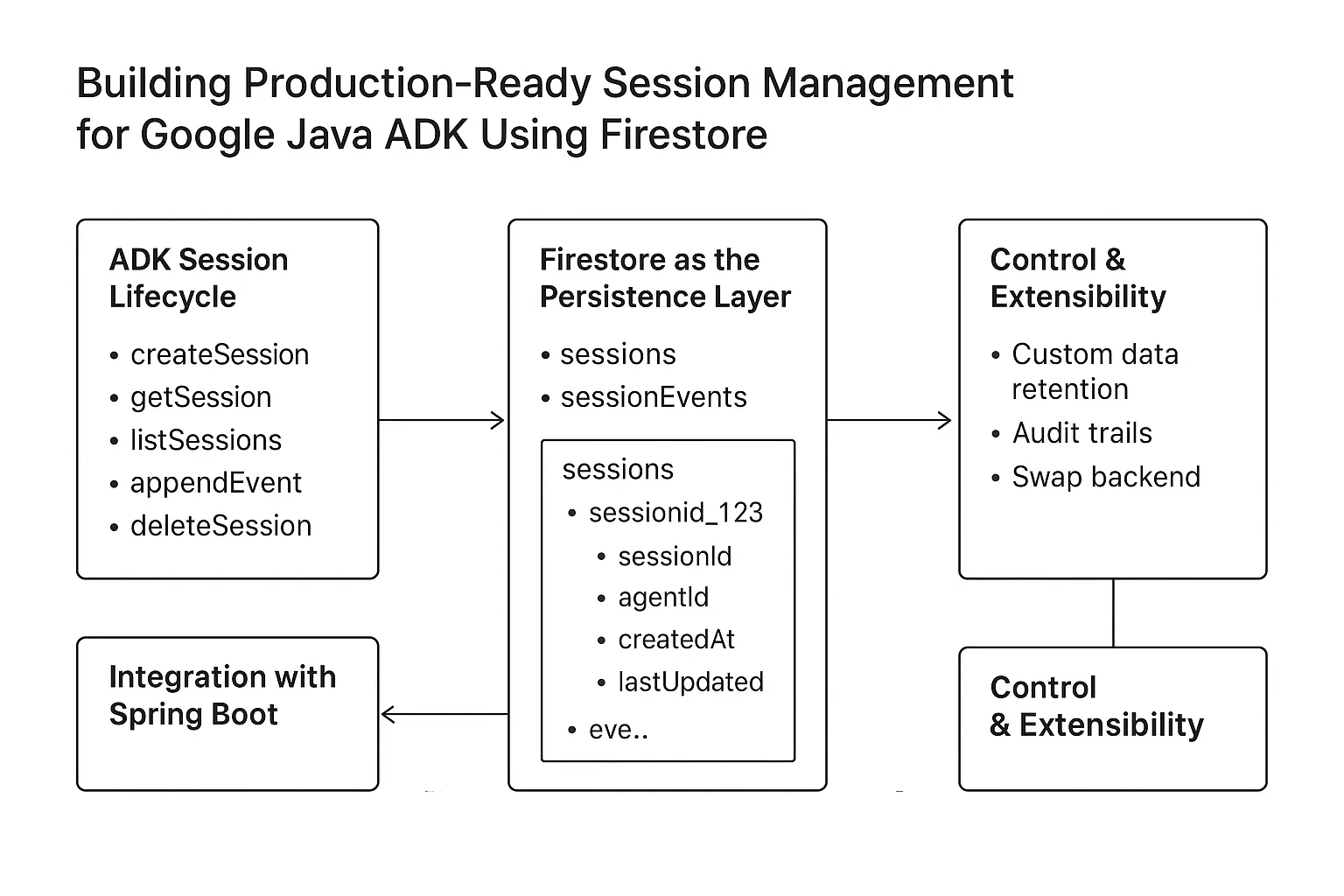
Google’s Java ADK (v0.4.0) is a powerful framework for building AI agents, but its default session services fall short when it comes to production readiness. While InMemorySessionService works for demos and local testing, it doesn’t persist state across restarts or scale across multiple instances. Meanwhile, VertexAiSessionService introduces unnecessary complexity, requiring an undocumented “Reasoning Engine.” In this article, we’ll walk through a clean and reliable approach to implementing a Firestore-backed session management service that integrates seamlessly with Spring Boot — or any Java-based environment — and runs natively within the Google Cloud ecosystem. Here is the life cycle of Java ADK components
The Power of Custom Storage: Control & Observability
Moving beyond InMemory or managed black-box services by implementing custom storage (like Firestore) provides two critical advantages for enterprise-grade AI agents:
- Data Control & Governance: By owning the storage layer, you define the security rules, data retention policies, and residency. This ensures that sensitive conversation history remains within your VPC and complies with organizational security standards, rather than relying on default provider behaviors.
- Radical Observability: AI agents are non-deterministic. For production systems, you need to see exactly how an agent arrived at a response. Custom storage allows you to persist the full lifecycle of an interaction — including granular tool calls, internal sub-steps, and latent events — providing a rich audit log that is invaluable for debugging and improving agent reliability.
- Cost Optimization: Managed "Reasoning Engines" or heavy session services often come with fixed costs or premium pricing models. By using a serverless, pay-per-use database like Firestore, you only pay for the specific read/write operations of your active sessions. This eliminates the need for expensive, always-on infrastructure and scales cost linearly with actual usage.
- Unlimited Customization & Extensibility: Custom storage isn't just a place for logs — it's an extension of your business logic. You can enrich session data with custom metadata (e.g., linking to a specific Support Ticket ID), implement multi-modal context (storing images/files alongside text), or even trigger real-time analytics and side-effects (like notifying a human operator) the moment a specific event is persisted.
Firestore-backed Session Service Implementation
The shortcoming of the user session persistance implementation of Firestore-backed session service for Google AI SDK is now addressed with the following code snippets. First, here is the FirestoreDatabaseRunner that initializes the Firestore client and provides access to the Firestore database instance. Add the dependnacy to your build file
                <dependency>
                    <groupId>com.google.adk</groupId>
                    <artifactId>google-adk-firestore-session-service</artifactId>
                    <version>0.4.0</version>
                </dependency>
        <?xml version="1.0" encoding="UTF-8"?>
        <project xmlns="http://maven.apache.org/POM/4.0.0"
    xmlns:xsi="http://www.w3.org/2001/XMLSchema-instance"
    xsi:schemaLocation="http://maven.apache.org/POM/4.0.0 http://maven.apache.org/xsd/maven-4.0.0.xsd">
        <modelVersion>4.0.0</modelVersion>

    <groupId>com.example.agent</groupId>
    <artifactId>demo</artifactId>
    <version>1.0-SNAPSHOT</version>

    <properties>
        <maven.compiler.source>17</maven.compiler.source>
        <maven.compiler.target>17</maven.compiler.target>
    </properties>

    <dependencies>
        <dependency>
            <groupId>com.google.adk</groupId>
            <artifactId>google-adk</artifactId>
            <version>0.4.0</version>

        </dependency>
        <dependency>
            <groupId>com.google.adk</groupId>
            <artifactId>google-adk-firestore-session-service</artifactId>
            <version>0.4.0</version>

        </dependency>
        <dependency>
            <groupId>com.google.cloud</groupId>
            <artifactId>google-cloud-firestore</artifactId>
            <version>3.30.3</version>
        </dependency>

    </dependencies>
</project>
                package com.example.agent;

import com.google.adk.agents.RunConfig;
import com.google.adk.sessions.FirestoreSessionService;
import com.google.adk.events.Event;
import com.google.adk.runner.FirestoreDatabaseRunner;
import com.google.adk.sessions.Session;
import com.google.cloud.firestore.Firestore;
import com.google.cloud.firestore.FirestoreOptions;
import com.google.genai.types.Content;
import com.google.genai.types.Part;
import io.reactivex.rxjava3.core.Flowable;
import com.google.adk.agents.BaseAgent;
import com.google.adk.tools.Annotations.Schema;
import java.util.Map;
import java.util.Scanner;
import com.google.adk.agents.LlmAgent;
import com.google.adk.tools.FunctionTool;

import static java.nio.charset.StandardCharsets.UTF_8;

public class FirestoreCliRunner {

    public static void main(String[] args) {
        RunConfig runConfig = RunConfig.builder().build();
        String appName = "hello-time-agent";

          BaseAgent timeAgent = initAgent();
        // Initialize Firestore
        FirestoreOptions firestoreOptions = FirestoreOptions.getDefaultInstance();
        Firestore firestore = firestoreOptions.getService();


        // Use FirestoreDatabaseRunner to persist session state
        FirestoreDatabaseRunner runner = new FirestoreDatabaseRunner(
                timeAgent,
                appName,
                firestore
        );


        Session session = new FirestoreSessionService(firestore)
                .createSession(appName,"user1234",null,"12345")
                .blockingGet();

        try (Scanner scanner = new Scanner(System.in, UTF_8)) {
            while (true) {
                System.out.print("\nYou > ");
                String userInput = scanner.nextLine();
                if ("quit".equalsIgnoreCase(userInput)) {
                    break;
                }

                Content userMsg = Content.fromParts(Part.fromText(userInput));
                Flowable<Event> events = runner.runAsync(session.userId(), session.id(), userMsg, runConfig);

                System.out.print("\nAgent > ");
                events.blockingForEach(event -> {
                    if (event.finalResponse()) {
                        System.out.println(event.stringifyContent());
                    }
                });
            }
        }
    }

    /** Mock tool implementation */
    @Schema(description = "Get the current time for a given city")
    public static Map<String, String> getCurrentTime(
        @Schema(name = "city", description = "Name of the city to get the time for") String city) {
        return Map.of(
            "city", city,
            "forecast", "The time is 10:30am."
        );
    }

     private static  BaseAgent initAgent() {
        return LlmAgent.builder()
            .name("hello-time-agent")
            .description("Tells the current time in a specified city")
            .instruction("""
                You are a helpful assistant that tells the current time in a city.
                Use the getCurrentTime tool for this purpose.
                """)
            .model("gemini-2.5-flash")
            .tools(FunctionTool.create(FirestoreCliRunner.class, "getCurrentTime"))
            .build();
    }

}
mvn clean compile exec:java -Dexec.mainClass="com.example.agent.FirestoreCliRunner"
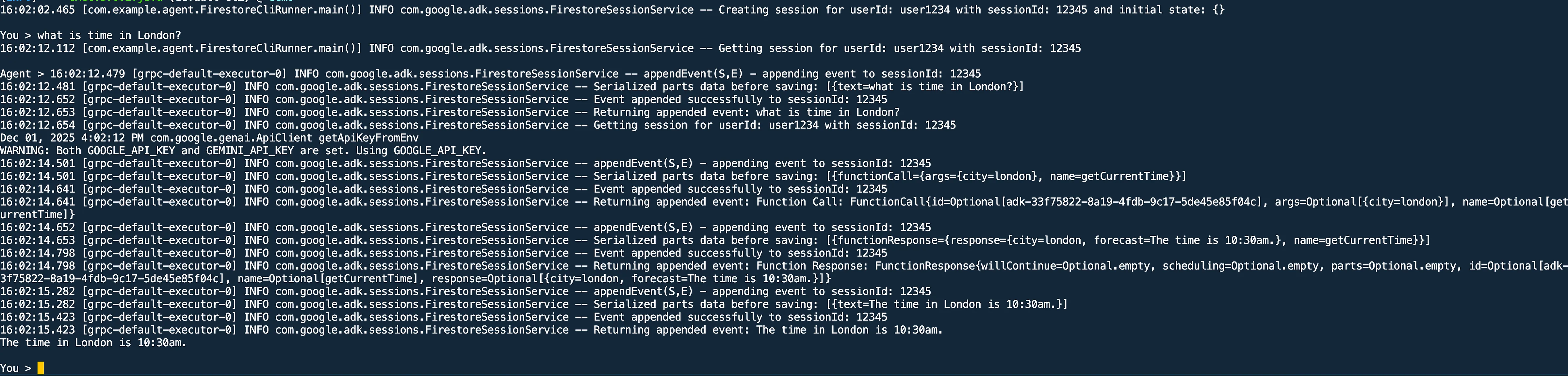 In firestore database, you should be seeing conversation being being populated as shown here, under user events
collection the you will see documents representing conversations.
In firestore database, you should be seeing conversation being being populated as shown here, under user events
collection the you will see documents representing conversations.
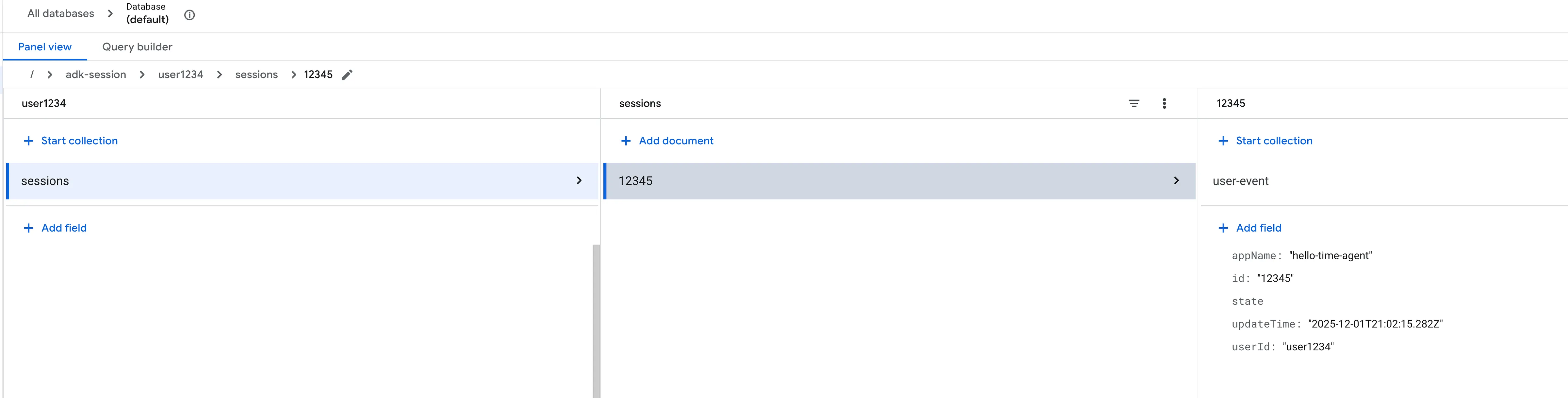 Each document contains details about the messages exchanged between the user and the agent, including tool
invocations and responses.
Each document contains details about the messages exchanged between the user and the agent, including tool
invocations and responses.