MCP Client & Server for building enterprise applications
The Model Context Protocol (MCP) client-server architecture enables seamless integration between large language models (LLMs) and external tools or services. The MCP Client, embedded within the host application, translates LLM requests into standardized MCP format and manages communication with MCP Servers. These servers expose various capabilities, such as database queries or email sending, allowing LLMs to interact with real-world systems in a reliable manner. This architecture facilitates scalable and flexible AI applications by providing a universal interface for LLMs to access diverse external resources.
MCP Client-Server Architecture Diagram
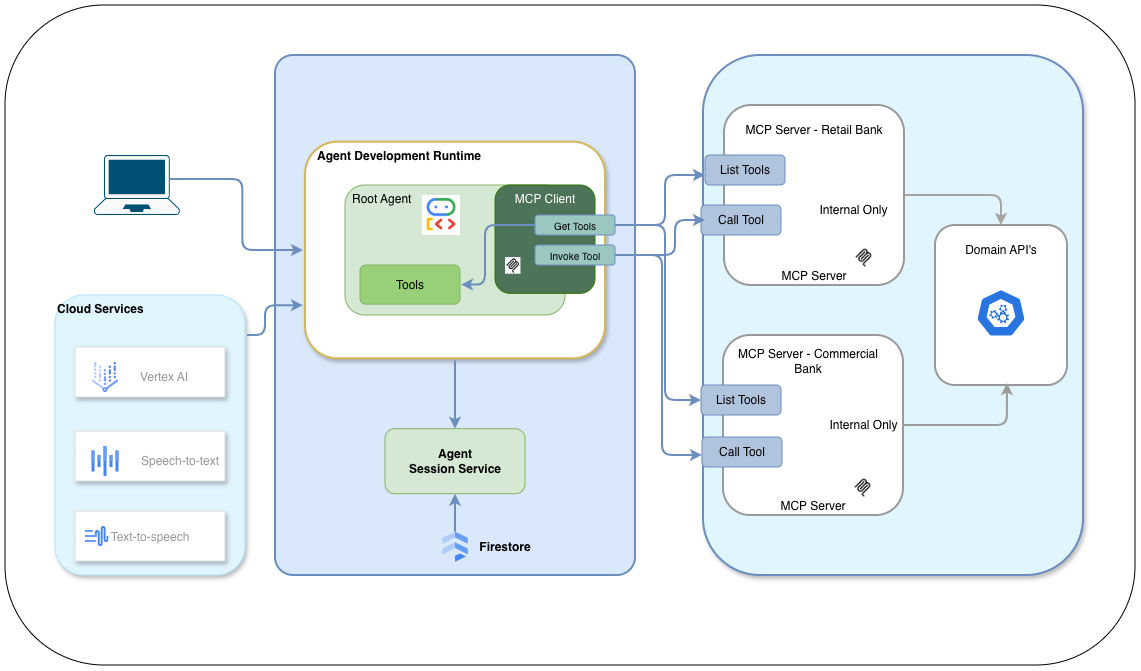
- MCP Host: The main application that houses the LLM and MCP Client, managing user interactions. Like a custom AI chatbot or an AI-enhanced IDE.
- MCP Client: A module within the host application that translates LLM requests into MCP format and handles communication with MCP Servers. The client be add one or more MCP servers based on the business.
- MCP Server: External services that expose various tools and resources, connecting to real-world systems like databases or APIs. These MCP server's can be treated as reusable components that can be re-used with in the enterpise for different line of business aplications. For the enterprise needs the MCP servers used by business applications can be just internal to the environment.
- Transport Layer: The communication channel (e.g., HTTP/SSE, STDIO) used for message exchange between the MCP Client and Servers. Typically for enterprise SSE woudl be preferred over HTTP.
- Client Host: MCP Client Host consist of Java ADK and MCP Client, which is responsible for processing the user inputs, and sending the requests to MCP Server. MCP Client uses the SSE based connection to communicate with MCP Server from Java ADK. This example does not include any security mechanism, but one can incorporate any oauth based implementation for securty.
- MCP Server - Billing: This server exposes two tools namesly authorize the payments and process the payments. Authorize you can consider as a query to validate the idendification of the user and process the payment woudl be by collecting the card details invoke the necessary API to process the payment.
- MCP Server - Send Email: This server exposes a tool to send email to the user. A generic tool that takes recepient, subject and body as input and send the email.
- Cloud Services: Google Cloud Platform (GCP) services are used to host the MCP Client and MCP Servers, and also Java ADK gives you flexibility to integrate with any public LLM's. also in this example we will also demostrate how we can levarage the speech-to-text and text-to-speech capabilites for complete voice over communication. this woudl be added as its own article.
- mcp_cli_client
- mcp_billing_server
- mcp_email_server
Here is the link to the source code for this example. Upon clone of the repository you will see the following structure:
From the root of the repository, cd in to the mcp_email_server folder and run the following command:
gcloud builds submit .
Upon successful deployment, the output will include a secure HTTPS URL. Please take note of this URL, as
it will be required for configuring the MCP client host.

Next, we will configure the billing server. Follow the same steps used for the email server and record the resulting URL.
Finally, let's set up our MCP client. This is where we'll plug in the URLs we got in the previous steps.
To show how flexible the Java ADK is, we've created two versions of the client. The first,
McpCliClient, saves your conversation history to Firestore. The second,
McpCliClientInMemory, keeps the history in memory. This demonstrates how the ADK can easily
work with different data storage methods.
In the McpCliClient class, you'll find the MCP server URLs set up like this, where
mcp_billing_server_url and
mcp_email_server_url are the URLs you noted earlier:
For this example we are using SSE as the transport layer for communication between MCP Client and MCP
Server.
You would also need to set up the Firestore credentials in the environment where you run the MCP Client
Host and for Java ADK to connect and store the conversation history and ADK also needs GEMINI_API_KEY to
be set.
String mcpUrl = "https://mcp-billing-server-964252795915.us-central1.run.app/billing-domain-tools/sse,https://mcp-email-server-964252795915.us-central1.run.app/email-domain-tools/sse";
After setting up the URLs, you can run the MCP client application. It will interact with the MCP servers to handle billing and email functionalities as requested by the user. This setup showcases how the MCP Client-Server architecture enables seamless integration between LLMs and external services, allowing for scalable and flexible AI applications. To launch the MCP Client Host, you can use the following command from the mcp_cli_client folder of the repository:
mvn clean compile exec:java -Dexec.mainClass="com.example.garvik.McpCliInMemoryClient"